
Walk through a Moorabbin workshop, warehouse or trade office and you’ll find the same quiet patchwork. A spreadsheet for jobs. A shared inbox for orders. A whiteboard for scheduling. A system for invoices that doesn’t talk to any of them.
It works, mostly. Until the one person who understands it is away, or the business doubles in size, or an important detail slips between two tools.
That’s the problem custom software is meant to solve. It’s software built around the way your business already runs, not the other way round. This guide explains what Moorabbin businesses actually build, what a custom software service involves and how to decide whether it’s the right move.
What is custom software?
Custom software is a system designed and built for one business, or one type of business, instead of the general market. Rather than adapting your process to fit an off-the-shelf product, the software is shaped to fit your process.
It might be a job-management system, a stock-tracking tool, a customer portal, a booking platform or an internal dashboard. It might replace several spreadsheets, or connect the tools you already use so information flows automatically.
If you’re weighing up whether it’s worth the investment, our guide on whether custom software development is worth it for Melbourne and Moorabbin businesses covers the decision in detail. This post focuses on what it looks like in practice around Moorabbin.
What a custom software service includes
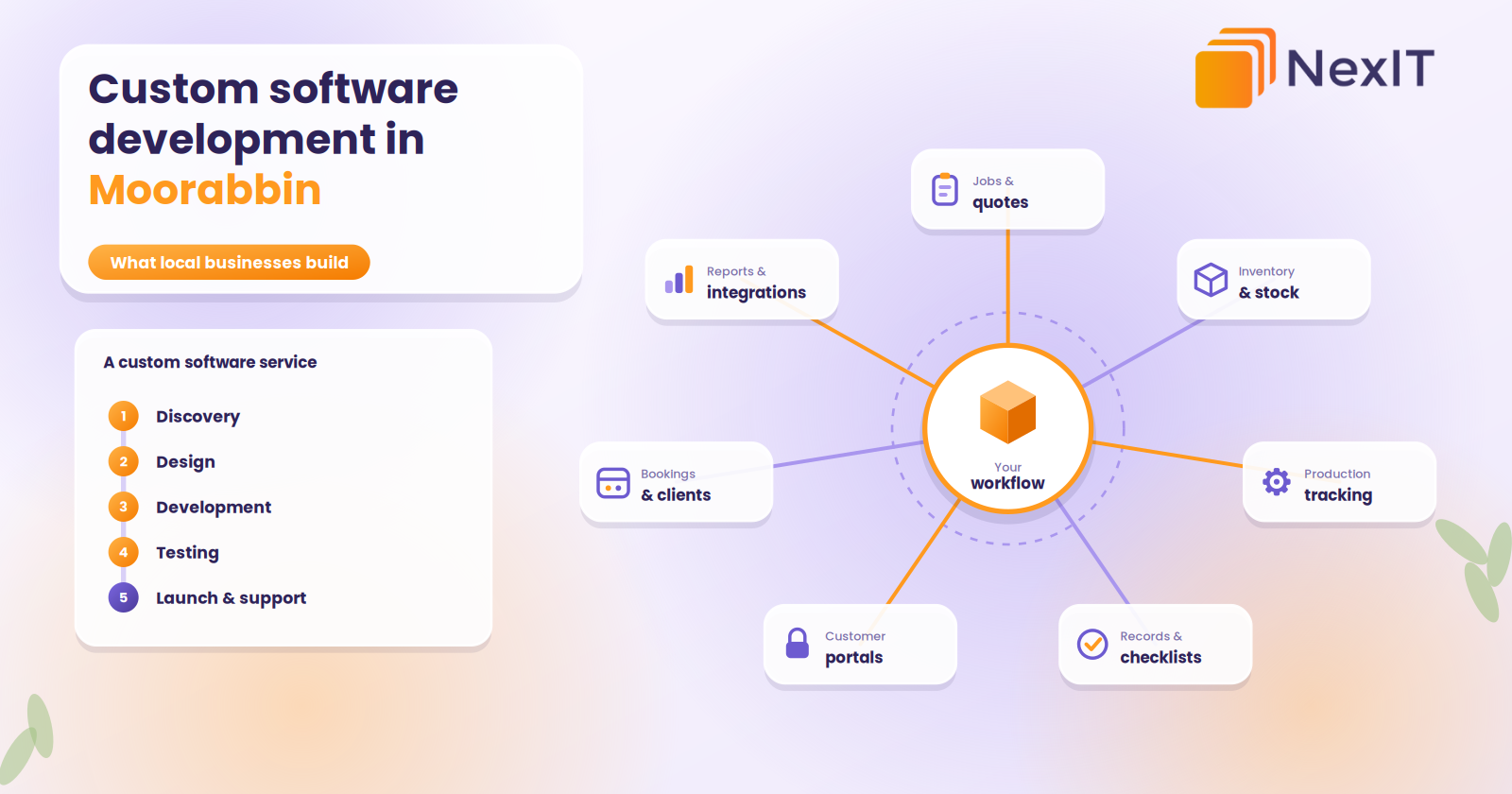
When you hire a company for a custom software service, you’re not just buying code. A good service covers the whole journey:
- Discovery. Understanding how your business actually works: who does what, which tools you use and where things go wrong.
- Planning. Deciding what to build first, what can wait and what success looks like.
- Design. Mapping screens and workflows before development starts, so you can react to something real.
- Development. Building the system, including the database, logins, integrations and admin tools.
- Testing. Checking it with real scenarios, real devices and real data.
- Launch and training. Getting the system live and your team confident using it.
- Support and improvement. Fixing issues, applying updates and adding features as your business changes.
If a quote only covers “development”, ask what happens before and after. The discovery and support stages are often what separate software that works from software that’s abandoned.
Software in Moorabbin: what local businesses actually build
Moorabbin has a big industrial area on its eastern side, the Moorabbin Airport precinct, and neighbouring suburbs such as Cheltenham, Highett, Bentleigh East, Mentone and Heatherton. It sits within the City of Kingston, where manufacturing, healthcare and retail are among the major industries. That mix produces some very practical software needs.
1. Job management and quoting systems for trades
What it replaces: spreadsheets, paper job sheets, texts and memory.
Trades and field-service businesses use custom systems to take enquiries, create quotes, schedule crews, capture photos and signatures on site and send invoices straight from the job. When it connects to accounting software, nobody re-enters anything.
2. Inventory and warehouse systems for distributors and suppliers
What it replaces: stock spreadsheets, manual counts and “ask Dave” systems.
These track stock levels, locations, receiving, picking and dispatch, often with barcode scanning. They send reorder alerts and keep sales, purchasing and the warehouse looking at the same numbers.
3. Production and job tracking for manufacturers and fabricators
What it replaces: whiteboards, printed travellers and chasing people for updates.
A tracking system shows where each job is, what’s next, who’s working on it and what materials are needed. Managers see delays early instead of finding out when a customer rings.
4. Records, checklists and compliance for workshops and technical businesses
What it replaces: paper forms, filing cabinets and end-of-month scrambles.
Workshops, maintenance operators and technical services often need consistent records, inspection checklists, certificates and sign-offs. Custom software captures these as the work happens, keeps them searchable and reminds you when something is due.
5. Customer portals and ordering systems for wholesalers
What it replaces: phone and email orders, manual price lookups and “where’s my order?” calls.
Trade customers log in, see their own pricing, reorder and check order status. Our post on customer portals for Moorabbin wholesalers explains when that’s worth building.
6. Booking and client management for clinics and service businesses
What it replaces: paper diaries, phone bookings and scattered client notes.
These handle appointments, reminders, client records and follow-ups, with privacy and access controls taken seriously.
7. Reporting dashboards and integration hubs
What it replaces: monthly reports assembled by hand from five different systems.
Sometimes the most valuable piece of custom software isn’t a big new system. It’s a layer that connects your existing tools, such as accounting, CRM, inventory and email, and shows the key numbers in one place. Pairing that with workflow automation, which we cover in our guide to business automation in Moorabbin, often delivers the biggest early win.
Custom or off-the-shelf? A practical test
Off-the-shelf software is the right answer for plenty of needs. Accounting, email and payroll are rarely worth building. Ask these three questions before you commit to a custom build.
1. Does an existing product fit at least 80 per cent of how we work?
If yes, use it. A custom build for the remaining 20 per cent rarely pays off immediately.
2. Are we stitching together several tools with manual workarounds?
If your team spends hours copying data between systems, a custom solution or integration may save more than another subscription.
3. Is this process part of what makes our business different?
If the way you quote, schedule, produce or serve customers is a competitive advantage, it’s worth building software that supports it, not forcing it into someone else’s template.
Also consider cost over time. Subscriptions per user can grow quickly, while a custom system can be built around your pricing and growth. Our guide to custom software development costs in Melbourne and Moorabbin explains what drives the price.
Local team or offshore? An honest comparison
Many Melbourne results come from offshore teams, or agencies that service Moorabbin “remotely”. There’s nothing wrong with remote work as such, but it’s worth knowing what you’re choosing.
Where a local team helps:
- They can visit. A developer who walks through your warehouse, workshop or hangar sees how the work really happens, which rarely matches the process on paper.
- Same time zone and quick support when something breaks.
- Familiarity with Australian requirements, including privacy obligations and common accounting tools like MYOB and Xero.
- Easier relationship. In-person workshops at the start of a project save weeks of back-and-forth.
Where offshore can work:
- Lower hourly rates for well-defined work
- Specialised skills you can’t find locally
What to ask either way:
- Who is actually writing the code, and where are they based?
- Where will your data be stored, and who can access it?
- How will we communicate, and how quickly will you respond?
- Who owns the source code and the accounts?
For anything involving customer data, financial information or your core operations, knowing who’s behind the work matters more than the hourly rate.
Talk to a NexIT Expert
New Enquiries: 1300 899 259 | Support Team: [email protected]
REQUEST A FREE CONSULTATION
What a project looks like: an illustrative example
To make this concrete, imagine a small fabrication business in the Moorabbin industrial area. Quotes are built in spreadsheets, job progress lives on a whiteboard and customers phone to ask where their order is.
A custom software service would typically:
- Discover. Spend time on the floor, map how a job moves from enquiry to delivery and identify the three biggest delays.
- Plan a first version. Quote builder, job tracker and customer status updates, with accounting integration left for the next phase.
- Design. Mock up the screens so the team can comment before anything is built.
- Build and test. Develop in stages, testing with real jobs.
- Pilot. Run it alongside the old process for a few weeks.
- Launch and train. Move fully across and keep improving.
This is an illustration, not a case study, but it reflects how well-run projects tend to go: small, staged and grounded in how people actually work.
What affects the cost and timeline
Your users decide. In Australia, iPhone has the larger share of mobile use among consumers, so customer-facing apps often start on iOS. In warehouses, workshops and logistics, Android handhelds and rugged devices with built-in scanners are common.
There’s no flat price, and anyone who quotes one without asking questions is guessing. The main factors are:
- The number and complexity of features
- How many types of users the system has
- Integrations with accounting, inventory, CRM or other tools
- Data migration from existing systems
- Design and branding
- Security and compliance requirements
- Ongoing support and hosting
A focused first version can take a few months. Larger systems with several user roles and integrations take longer. Launching with the essentials, then expanding, keeps both cost and risk under control.
Risks to manage
Custom software projects go wrong in predictable ways. Plan for them:
- Scope creep. Every “while we’re at it” adds cost. Keep a list for later phases.
- Poor adoption. Involve the people who will use the system, and train them.
- Messy data. Migrating old records takes planning and cleaning.
- Lock-in. Make sure you own the code, data and hosting accounts.
- No support plan. Software needs updates and care after launch.
- Over-engineering. Build what you need now, not what you might need in five years.
How to choose a custom software provider
- Do they start with your process, not a feature list or a sales pitch?
- Can they show relevant examples and put you in touch with past clients?
- Do they explain trade-offs honestly, including when you don’t need custom software?
- Is pricing itemised, with a clear approach to changes?
- How do they handle testing, security and privacy?
- Who owns the code and data?
- What does support look like after launch?
- Can they meet in person at your site?
Red flags
- A fixed price with no discovery phase
- Vague claims such as “fraction of the cost” with no explanation of scope
- No mention of testing, security or support
- Reluctance to say who does the work
- Contracts that keep ownership of the code
- Pressure to sign quickly
What is custom software development?
It’s the process of designing and building software for the specific needs of one business, not buying a ready-made product. The result fits your workflows, connects with your existing tools and can grow as you do.
How much does custom software development cost in Moorabbin?
It depends on the features, user roles, integrations, design and security requirements. A focused internal tool costs much less than a full platform. Ask for an itemised quote that covers testing, deployment and support, and consider starting with a limited first version.
How long does it take to build custom software?
A simple app can take a few months. Apps with user accounts, payments, offline features and integrations take longer. Launching a focused version first and expanding later is usually the fastest route to something useful.
Is custom software better than off-the-shelf software for a small business?
Not always. Off-the-shelf software suits standard needs like accounting or email. Custom software makes sense when your processes are unusual, your tools don’t connect or manual work is costing you significant time. A good provider will tell you honestly which applies.
What does a custom software service include?
A complete service covers discovery, planning, design, development, testing, launch, training and ongoing support. Check each stage is in the quote, since planning and support are often what make the difference between software that’s used and software that’s abandoned.
Not sure which is right for your business?
The best choice depends on what your website needs to do for you, and a short conversation usually makes it clear. NexIT Solutions helps Melbourne businesses plan, design and build websites on WordPress, custom platforms and everything in between, and we’ll tell you honestly which one fits.
📞 Call NexIT Solutions today: 1300 899 259